Looking for Best Social Media Apps For Marketers?
Here’s the uncomfortable truth: most marketers don’t have a tool problem. They have a stack problem. We collect apps like Pokémon cards, each one promising to solve a specific pain point, until suddenly we’re paying $400 a month for features that overlap and workflows that don’t connect.
I’ve spent the last several years helping businesses untangle their social media operations, and honestly? The pattern is always the same. Tool bloat creeps in slowly, then hits the budget all at once.
The average marketing team uses between 12 and 20 different tools. That’s not a flex—that’s a problem.
When you’re searching for the best social media apps for marketers, you’ll find hundreds of listicles ranking individual tools in isolation. “Here are the top 50 social media apps!” Great. Now what? You’re left figuring out which ones actually work together, which features duplicate each other, and whether you really need three different analytics dashboards. Spoiler: you probably don’t.
The stack approach flips this on its head. Instead of collecting tools, you build a cohesive system where each piece serves a specific function and connects to everything else. Think of it like a kitchen: you don’t need six different knives that all do roughly the same thing. You need a thoughtful set that covers your actual cooking needs.
By the end of this guide, you’ll walk away with three complete stacks based on your business size and budget, plus a 15-minute audit process to evaluate your current setup.
The 5 Tool Categories Every Social Media Marketer Actually Needs
Before we build any stacks, let’s get clear on what categories you’re working with. Every effective social media operation needs coverage in these five areas:
1. Content Scheduling and Publishing Your social media scheduling apps handle the basics: queue posts, set times, and publish across platforms. The best ones also offer content calendars and approval workflows.
2. Analytics and Reporting You need tools to track social media engagement and generate reports that actually mean something to stakeholders. Native platform analytics only get you so far.
3. Content Creation This category covers graphics, video editing, and copywriting assistance. It has absolutely exploded with AI features in 2025.
4. Community Management Inbox consolidation, comment monitoring, and response management fall here. This category is critical if you’re managing multiple social accounts across platforms.
5. Listening and Research Brand mentions, competitor monitoring, and trend tracking round out the essentials. Often overlooked, this category is incredibly valuable for strategic decisions.
The goal isn’t to have the “best” tool in every category. It’s to have tools that work together without redundancy. [Link: social media strategy fundamentals]
Stack #1: The Bootstrap Stack—Best Free and Low-Cost Apps for Solopreneurs
Budget: $0 to $50/month
If you’re a solopreneur or early-stage founder, every dollar matters. The good news? You can build a genuinely effective stack without breaking the bank.
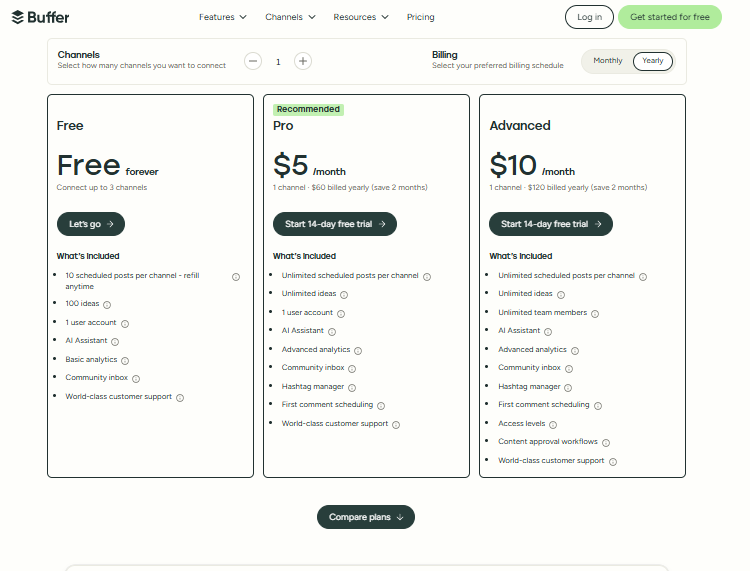
Scheduling: Buffer (Free Tier) or Later (Free Tier) Buffer’s free plan gives you three channels with limited scheduled posts (check their current pricing page for exact limits—plans update frequently). Later offers similar capabilities with better Instagram planning features. Pick one based on your primary platform. Don’t overthink this.
Analytics: Native Platform Analytics + Google Analytics 4 Here’s my honest take: at this stage, you don’t need a paid analytics tool. Instagram Insights, LinkedIn Analytics, and TikTok Analytics give you what you need. Connect everything to GA4 for website traffic tracking and call it done.
Content Creation: Canva (Free) + CapCut (Free) Canva’s free tier is genuinely powerful for static graphics. CapCut handles video editing without watermarks. Together, they cover 90% of content creation needs.
Community Management: Native Apps At this volume, you can manage comments and DMs directly in each platform’s app. No need to add another tool yet.
Listening: Google Alerts + Manual Monitoring Set up Google Alerts for your brand name and key competitors. It’s not sophisticated, but it works.
Total Monthly Cost: $0 to $29
The Bootstrap Stack proves you can find the best social media apps for marketers without spending hundreds monthly. What you sacrifice is time and integration—everything’s manual, and nothing talks to anything else. But if your budget’s tight, this gets the job done.
Stack #2: The Growth Stack—Balancing Power and Price for Small Businesses
Budget: $100 to $300/month
You’ve got revenue coming in. Maybe a small team. You need social media apps for small businesses that scale without requiring enterprise contracts.
Scheduling: Metricool (Starting Around $18/Month Annually) or Publer (Starting Around $12–24/Month) Both offer excellent scheduling across platforms with reasonable pricing. Metricool edges ahead on analytics integration, while Publer has better team collaboration features. I lean toward Metricool for solo operators and Publer when you’re adding team members. Note that pricing varies by plan tier and billing cycle, so check their current pricing pages.
Analytics: Metricool (Included) + Socialinsider (Starting Around $99/Month) If you chose Metricool for scheduling, you’ve already got solid analytics built in. Add Socialinsider for competitive benchmarking and deeper social media analytics reporting. This combination gives you both operational metrics and strategic insights. Socialinsider offers multiple tiers with varying features, so evaluate based on your specific needs.
Content Creation: Canva Pro ($12.99/Month Billed Annually, or $14.99/Month Billed Monthly) + Adobe Express Premium ($9.99/Month) Canva Pro unlocks brand kits, background remover, and resizing features that save hours. Seriously—hours. Adobe Express adds video templates and integration with other Adobe tools if you use them.
Community Management: NapoleonCat (Pricing Varies by Plan) Now things get interesting. NapoleonCat consolidates your inboxes, automates common responses, and tracks team performance. It’s a massive time-saver when managing multiple social accounts becomes unwieldy. Check their website for current pricing tiers.
Listening: Brand24 (Starting Around $79–99/Month for Basic Plans) Brand24 provides real-time mention monitoring across social, news, blogs, and forums. The sentiment analysis helps you catch potential PR issues before they explode.
Total Monthly Cost: $150 to $300+
The Growth Stack introduces real social media automation tools that start compounding your time savings. You’re paying for integration and efficiency, not just features.
Stack #3: The Scale Stack—Enterprise-Grade Tools Worth the Investment
Budget: $500+/month
At this level, you’re managing a significant social presence, multiple team members, and stakeholders who expect polished reports.
All-in-One Platform: Sprout Social (Starting Around $249/Month per Seat) or Hootsuite (Various Tiers Available) Here’s where I’ll give you a strong opinion: Sprout Social is worth the premium. The interface is cleaner, the analytics are more actionable, and the customer support actually responds. Hootsuite works, but it’s showing its age. Both platforms update pricing regularly, so verify current rates.
Sprout handles scheduling, analytics, inbox management, and basic listening all in one place. This consolidation alone justifies the cost.
Advanced Analytics: Brandwatch (Custom Enterprise Pricing) or Sprinklr (Custom Pricing) For serious competitive intelligence and social media analytics apps that executives trust, you’re looking at enterprise tools. Brandwatch’s consumer intelligence capabilities are genuinely impressive. Sprinklr offers the most complete platform but comes with implementation complexity. Both require custom quotes.
Content Creation: Adobe Creative Cloud All Apps ($54.99–59.99/Month) + Specialized AI Tools At this budget level, you probably have design resources, but apps to automate social media posting can help with volume. Tools like Jasper or Copy.ai assist with copy generation, while Adobe Express handles quick social assets.
Listening: Brandwatch (Included) or Meltwater (Custom Enterprise Pricing) Enterprise listening tools offer historical data, custom dashboards, and analyst support. They’re overkill for small teams but necessary for brands where reputation matters at scale.
Total Monthly Cost: $500 to $2,000+
The Scale Stack isn’t about having the “best” tools. It’s about having tools that won’t break when your volume doubles and that satisfy stakeholders who need enterprise-grade reporting.
The Integration Factor: Building a Stack That Talks to Itself
Here’s where most marketers mess up: they pick great individual tools that don’t connect.
Your stack should flow data automatically. When someone engages with a post, that information should sync to your CRM. When you publish content, it should appear in your analytics dashboard without manual imports. Makes sense, right? [Link: marketing automation strategies]
Look for these integration points:
Native Integrations: Check if tools connect directly. Sprout Social integrates with Salesforce. Buffer connects with Zapier. These native connections are more reliable than workarounds.
Zapier/Make Workflows: For tools without direct integration, automation platforms bridge the gap. A simple Zap can push new leads from social to your email list automatically.
API Access: At higher price tiers, API access lets you build custom integrations. This is only relevant if you’ve got development resources, but it’s incredibly powerful when available.
Before adding any new tool, ask yourself: “How does this connect to what I already use?” If the answer is “It doesn’t,” think twice about whether it’s worth the manual overhead.
AI Social Media Tools in 2025: Genuine Time-Savers vs. Overhyped Features
Let’s talk about AI. Every tool now claims AI capabilities, but not all AI features actually save time.
Genuinely Useful AI Features:
- Caption generation that learns your brand voice
- Optimal posting time recommendations based on your audience
- Automated first-draft replies for common questions
- Image resizing and formatting across platforms
- Performance prediction for content before posting
Overhyped AI Features:
- “AI strategy” tools that generate generic recommendations
- Fully automated posting without human review (yikes)
- AI-generated content that still needs heavy editing
- Sentiment analysis that can’t distinguish sarcasm
- “AI insights” that just restate obvious metrics
My advice? Use AI as an accelerant, not a replacement. The best social media tools for entrepreneurs in 2025 offer AI features that handle repetitive tasks while keeping humans in control of strategy and voice.
When evaluating how to choose the best social media app for marketing, look for AI that saves specific steps in your workflow. “AI-powered” as a marketing term means nothing. “AI generates first-draft captions that I edit in 30 seconds instead of writing from scratch”—that means something concrete.
You’ve seen three complete stacks and understand the categories. Now let’s put this into action.
Your 15-Minute Stack Audit:
Set a timer and answer these questions:
- List every tool you currently pay for that touches social media. Include the monthly cost.
- For each tool, identify which of the five categories it serves.
- Circle any tools that overlap in the same category.
- Star any tools that don’t integrate with anything else in your stack.
- Add up your total monthly spend.
Now compare against the appropriate stack for your budget. Where are you overspending? What gaps exist?
Tool Selection Checklist:
Before adding any new tool, run through these criteria:
- Does this replace something I already have, or does it add redundancy?
- What existing tools does this integrate with natively?
- What specific workflow does this improve? Can I quantify the time savings?
- Is the pricing transparent, or will I hit surprise limits?
- Does the free trial actually let me test my use case?
- What do other marketers at my stage say about it? (Not enterprise case studies—real people like you.)
The best social media apps for marketers aren’t always the most powerful or most expensive. They’re the ones that fit your specific needs, connect to your existing systems, and actually get used consistently.
Start with the stack that matches your current stage. Audit quarterly. And resist the urge to add “just one more tool” every time you see a shiny new feature.
Your future self—and your budget—will thank you.